

Mercedes-Benz of Danbury – MBUX Routines and Fingerprint Ease in the 2026 Mercedes-Benz GLC — A Ridgefield, CT Owner’s Guide
The 2026 Mercedes-Benz GLC brings everyday convenience to a new level with 3rd-gen MBUX and fingerprint recognition. For drivers who split time between quiet residential streets near Main Street in Ridgefield, CT and quicker cruises on Route 7, the GLC’s ability to anticipate your needs feels like a genuine quality-of-life boost. Rather than digging through menus, you set up Routines once and let the SUV handle the rest—lighting shifts to your preferred hue after sunset, heated seats kick in during early starts, and navigation suggests a favorite route when you head toward the office. Add fingerprint recognition, and your profile, layouts, and driver-assistance preferences appear with a single touch the moment you start the car.
That blend of personalization and polish is what makes the GLC such a compelling daily driver. The digital cockpit is crisp and responsive, and you can say simple, natural phrases to adjust climate, audio, and navigation without taking your eyes off the road. It’s all grounded in thoughtful design, so you spend less time managing features and more time enjoying the drive. If you’re shopping local, Mercedes-Benz of Danbury can show you how MBUX adapts to your routine in just a few minutes—set a couple of Routines, enroll your fingerprint, and watch the SUV tailor itself to you from the first mile.
How MBUX Routines fit real life
Think of MBUX Routines as a smart assistant for your drive. It can automate tasks based on triggers you define—time of day, location, temperature, or journey type—so the SUV quietly handles the little things that make a big difference in comfort and focus.
For Ridgefield-area commuting, that might mean the GLC nudges the cabin temperature warmer for morning starts, switches ambient lighting to a calm hue after dusk, or queues your podcast when you leave the driveway. Heading to the train station or a weekend hike? Set a Routine to surface directions the moment you connect your phone or when the system recognizes your destination pattern.
Simple ways to set up Routines
Getting started is easy. From the central display, open the MBUX menu, navigate to Routines, and choose common triggers like time, location, or conditions. Then pair each trigger with an action such as seat heating, ambient lighting, or a navigation shortcut. Once saved, your GLC takes it from there.
- Evening comfort: After sunset, set ambient lighting to your preferred color and turn on driver’s seat heating.
- Workday start: Weekdays at 7:30 a.m., cue MB Navigation to your office and resume your favorite news podcast.
- Hike-ready: When near your usual trailhead, pull up parking camera views and lower audio volume.
- Weekend family run: Mid-morning Saturdays, switch to a soft audio profile and enable a gentle climate preset.
You can create as many Routines as you like, and the system’s AI can even suggest new ones based on your patterns. It’s personalization without the hassle.
Fingerprint recognition: Personal in a single touch
Fingerprint recognition is the ultimate shortcut to your world inside the GLC. Press the sensor, and MBUX unlocks your profile—screen layouts, seat and mirror memory settings, navigation favorites, and driver-assistance preferences. Multiple drivers can enroll, which is especially helpful for households where one person spends more time on I-84 and another prefers scenic detours on Danbury Road. It’s quick, private, and reliably consistent, so your cabin looks and feels right every time you start the drive.
The feature also helps you keep shared settings tidy. If you lend your GLC to a family member, your personal shortcuts won’t be altered. Each fingerprint maps to its own preferences, with the system switching profiles in seconds. That means less fiddling and more familiarity, trip after trip.
Frequently Asked Questions:
Can I have multiple MBUX profiles with fingerprint recognition?
Yes. Each driver can enroll a fingerprint so the GLC immediately loads the correct profile, including display layouts, favorite destinations, and assistance settings.
Will MBUX Routines run if my phone isn’t connected?
Yes. Routines tied to location, time, or onboard conditions work independently. You can still set separate actions that trigger when your phone connects.
Do I need to speak specific commands for MBUX to work?
No. The 3rd-gen voice assistant recognizes natural phrases. You can say things like “I’m cold” or “Find the nearest coffee shop,” and the system responds intuitively.
Can Routines adjust safety or driver-assistance settings?
You can tailor how certain features present themselves—such as prompting camera views in parking scenarios—but core safety features operate according to established parameters. Our team can show you the best ways to align settings with your preferences.
How do Routines help on familiar Ridgefield routes?
Set a Routine for weekly activities—school drop-offs, train runs, or grocery trips—so navigation, audio, and climate settings appear automatically. It’s one less thing to think about on busy days.
Ultimately, the 2026 GLC’s MBUX and fingerprint recognition free you to focus on the drive, not the settings. The technology feels transparent and supportive, especially when paired with available 4MATIC® all-wheel drive that adds confident traction when roads are slick or the route turns hilly. And if you’re cross-shopping tech features among luxury SUVs, you’ll quickly notice how the GLC’s menus, voice responses, and on-screen logic are a step ahead—more intuitive, fewer taps, and smarter prompts at the right time.
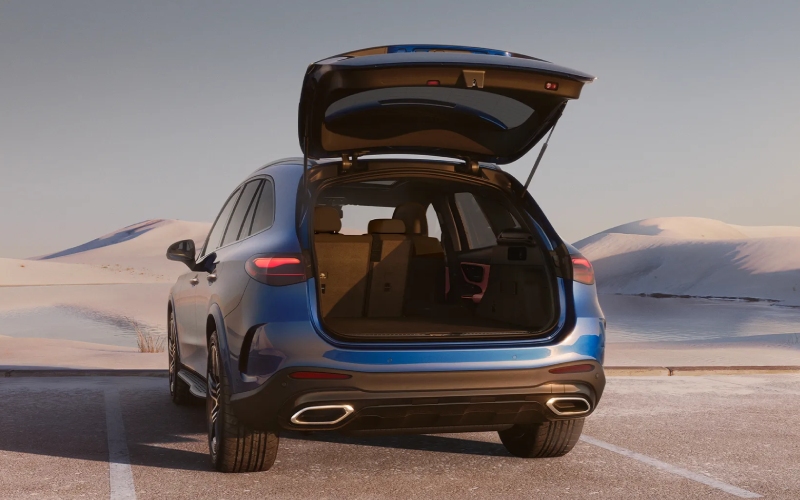
Stop by our showroom, serving Ridgefield, Westport, and Wilton, and see how a couple of minutes with MBUX can reshape your daily routine. A quick demo can show you how easily the system learns your habits, how fingerprint recognition keeps your settings in sync, and how the rest of the GLC’s thoughtful design—hands-free power liftgate, LED lighting, and spacious cargo area—fits seamlessly into your week. When luxury tech disappears into the background, you know you’ve found the right SUV to make every drive simpler.
From tailored profiles to time-saving automations, the GLC’s thoughtful intelligence adds genuine value to your day. Once you try it, you’ll wonder how you ever commuted without it—and how quickly the SUV felt like it was built just for you.
Request more 2026 Mercedes-Benz GLC information
Connect with us


Recent Blog Entries
- Can the 2026 Mercedes-Benz GLE simplify I-84 commuting in Danbury, CT?
- What to Know About the 2026 Mercedes-Benz GLE
- What to Know About the 2026 Mercedes-Benz Sprinter Cargo Van
- What to Know About the 2026 Mercedes-Benz GLC
- How the 2026 Mercedes-Benz GLB’s Flexible Seating and Voice-Control Tech Make Westport, CT Drives Easier